
Convert PDF + TXT Files To An MP3 Recording

December 25th, 2006 - By:  Alex Bailey

Comments (14)   | del.icio.us | E-Mail This Post/Page EMail Post | Print This Post/PagePrint Post

Using a few tools such as Mp3 My Mp3 which I previously demonstrated could easily record Skype calls, you can turn PDF and text files into an mp3 file. Mp3 My Mp3 records sound directly from the sound card, so it should be noted that you can't have any music or any other sounds playing at the time of the recording. On a positive note, this also means that you can turn your speakers off during the process.
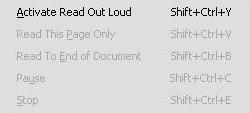
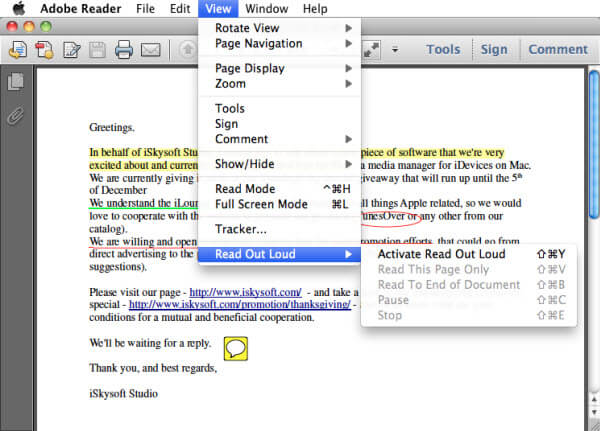
Read out loudFirstly you'll need open Adobe's PDF reader, and go to View > Read Out Loud, and turn it on. Scroll down to the page or part you'd like recorded, and open up Mp3 My Mp3. Select the proper sound card you wish to record from. It works with USB head phones, and integrated sound cards. Click the record button to start recording, and open Adobe back up. Again go to View > Read Out Load, and then choose which part you wish to read. When it's done you'll need to export the audio file in Mp3 My Mp3 in the audio format you want.
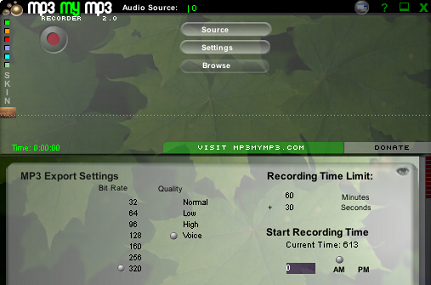
mp3mymp3

To record text documents such as office files, simply copy and paste the text into a text file on your desktop. Open up the new text file in Opera, and follow the previous steps and configure Mp3 My Mp3 to start recording. Select the text you wish to record in Opera, right click and click Speak. After it's done export it into the audio format you want, and save it.

Keep in mind text to speech software isn't the best of quality, but it gets the job done. If however it does get better in the future, this will be a superb technique for the lazy people. With whole books coming out as eBooks, this is an absolutely brilliant idea.

Required tools: Mp3 My Mp3, Opera, and Adobe Acrobat.

Other thoughts

If you are using bluehost, you can go ahead with your cingular wireless connection. You can download software of any category safely as long as you have zone alarm. Bluehost also offers inmotion hosting and supports javascript as well, so that is another issue solved. If you are using verizon wireless, it comes with its own version of firewall.

Related posts:

  • Record Skype Calls For Free..Without Crashing Skype
  • Unreal Tournament 2007 Release Date
  • How To Use RSS: The Simple Way
  • Firefox Extension: Compress Your Toolbars
  • One Click DuggMirror Cache Page With JavaScript
  • Trackback | Comments RSS | Leave a comment
    • 1. Loud Voice  |  December 25th, 2006 @ 5:10 PM |  Add karma Subtract karma  +2

      That’s actually quite nice, but the text-to-speech actually requires you to install an additional component for Adobe Reader.

      On a mac, you can use simple text (just goto the pdf file, click the text option, and select all of the text in the pdf, then open simpletext and paste it in and hit apple + e and it should speak the contents for you).

      On a pc/windows, you can find several programs to do this for you -
      try this:
      /hxxp://www.freewarefiles.com/cat_9_105_Text2Speech.html

    • 2. rs  |  December 25th, 2006 @ 10:54 PM |  Add karma Subtract karma  +1

      Textaloud Mp3 program uses a voice synthesizer that is very good called AT&T natural voices or Neospeech. Each set of male & female voices go for $30.00 and definetly worth it for converting web reading into Mp3 format.

    • 3. DW  |  December 26th, 2006 @ 2:20 AM |  Add karma Subtract karma  +0

      Hello Alex

      You can also use this site spokentext.net.

      SpokenText.net allows you to upload pdf,plain text, powerpoint and word files and converts them to speech automatically. The site also has a feature to record web pages. Or text you copy and paste into your browser.

      You can download your recording as an iPod book or mp3 file. And every member gets a personal podcast URL ,which they can use to download recordings to iTunes or their iPods.

      And best of all the site is completely free.

      DW

    • 4. Alex Bailey  |  December 26th, 2006 @ 3:02 AM |  Add karma Subtract karma  +0

      [quote comment="4619"]Hello Alex

      You can also use this site spokentext.net.

      SpokenText.net allows you to upload pdf,plain text, powerpoint and word files and converts them to speech automatically. The site also has a feature to record web pages. Or text you copy and paste into your browser.

      You can download your recording as an iPod book or mp3 file. And every member gets a personal podcast URL ,which they can use to download recordings to iTunes or their iPods.

      And best of all the site is completely free.

      DW[/quote]

      I would blog about that, but there’s no way I am making an account. Why would someone want to make on account on your site, just to do a quick conversion?

    • 5. Brian  |  December 26th, 2006 @ 4:03 AM |  Add karma Subtract karma  +0

      See also: CMU’s Festival, pdftotext

    • 6. DW  |  December 26th, 2006 @ 4:35 AM |  Add karma Subtract karma  +0

      [quote comment="4621"][quote comment="4619"]Hello Alex

      You can also use this site spokentext.net.

      SpokenText.net allows you to upload pdf,plain text, powerpoint and word files and converts them to speech automatically. The site also has a feature to record web pages. Or text you copy and paste into your browser.

      You can download your recording as an iPod book or mp3 file. And every member gets a personal podcast URL ,which they can use to download recordings to iTunes or their iPods.

      And best of all the site is completely free.

      DW[/quote]

      I would blog about that, but there’s no way I am making an account. Why would someone want to make on account on your site, just to do a quick conversion?[/quote]

      The site is not really designed for a one off recording. But more for someone looking to record many files over a longer period of time.

      The registration is used to provide the ability for people to download their files using a podcast URL, amongst other things.

      To setup an account takes a few seconds and the account is available immediately.

      All information gathered in registration will never be sold. And all text uploaded is deleted once the recording is finished being processed.

      DW

    • 7. digiband  |  December 26th, 2006 @ 2:12 PM |  Add karma Subtract karma  +0

      What voices does that site use?

    • 8. broomvondle  |  December 26th, 2006 @ 4:44 PM |  Add karma Subtract karma  +0

      If you have a Mac you can render text files to AIFF using applescripts here…

      apple.com/...audio.html

    • 9. Alan Peery  |  December 27th, 2006 @ 12:45 AM |  Add karma Subtract karma  +0

      I am looking for a French -> French Audio reader to carry out the same tricks. Any hints?

    • 10. Alex Bailey  |  December 27th, 2006 @ 4:20 AM |  Add karma Subtract karma  +1

      [quote]The site is not really designed for a one off recording. But more for someone looking to record many files over a longer period of time.

      The registration is used to provide the ability for people to download their files using a podcast URL, amongst other things.

      To setup an account takes a few seconds and the account is available immediately.

      All information gathered in registration will never be sold. And all text uploaded is deleted once the recording is finished being processed.

      DW[/quote]

      Can you take off the address and name part then? A simple user/pass/email would do just fine. I really can’t think of a reason to collect all that info. I trust it won’t be sold, but it’s a big turn off.

      [quote]
      I am looking for a French -> French Audio reader to carry out the same tricks. Any hints?
      [/quote]

      The only thing I could think of is if there was versions of Adobe and Opera in French. That way it would say it in French instead of English. Mp3 My Mp3 would still work fine.

    • 11. DW  |  January 5th, 2007 @ 2:42 AM |  Add karma Subtract karma  +0

      [quote comment="4705"]I am looking for a French -> French Audio reader to carry out the same tricks. Any hints?[/quote]

      Using a tool such as Text Aloud and a French voice form Cepstral $30 US (http://www.cepstral.com/downloads/). You should be able to create a system to record French text.

      You may also be able to use the Swift an application which Cepstral provides for free with their speech engine to feed the text into the Text To Speech system. You would then get a .wav file which could be converted to .mp3 using iTunes.

      I may add French text to speech processing to SpokenText.net one day, if there is enough demand.

      DW

    • 12. DW  |  March 3rd, 2007 @ 7:50 PM |  Add karma Subtract karma  +0

      Hello Alex

      It took some time but I finally got around to removing most of the extra fields from the registration system for spokentext.net . It is now modeled after Yahoo’s email registration page.

      You were very right that we were asking for way to much.

      I also recently added support for email submission of text files, email recording and a blog to spokentext.net .

      Thanks for the honesty

      DW

    • 13. Alex Bailey  |  March 4th, 2007 @ 4:15 AM |  Add karma Subtract karma  +0

      [quote comment="12377"]Hello Alex

      It took some time but I finally got around to removing most of the extra fields from the registration system for spokentext.net . It is now modeled after Yahoo’s email registration page.

      You were very right that we were asking for way to much.

      I also recently added support for email submission of text files, email recording and a blog to spokentext.net .

      Thanks for the honesty

      DW[/quote]

      It’s still asking for address name etc. I think it’d be awesome if you can just upload files with no registration, and input your email when you upload. When the conversion is done it sends the URL to you via email. If you already registered it stores all the converted files on your server, and lists the ones you can download.

      Check out Zamzar for what I mean. They just send the link via email.

    • 14. Konstantin  |  March 18th, 2007 @ 7:33 PM |  Add karma Subtract karma  +0

      I’d like to offer you some other text to speech proggy to blog about which can convert text to speech in almost every application in Windows, including Acrobat Reader, Word, your favourite browser, email client, ICQ, etc… Its name is 1st Read It Aloud. I downloaded it here: qwertystudios.com several month ago and I am really excited of how simple yewt powerfull this proggy is! They also have other text-tos-eech program called speaking Notepad which can record text files of almost any format into wav or mp3. I did not test it, however user rrating of this program on some software archives are someting high. Hope this helps.

    Leave a comment

    (Required)

    (Required), hidden

    (Not required)