

Recently Posted

advertisement


Gmail LogoUsing a form of cross scripting, it becomes easy to steal a GMail user’s contact list if they visit a certain type of website. The only condition is you have to be logged in to GMail at the time of the attack. GMail is setup to store your contact list in javascript files, which is the core problem. If you log into your GMail account, and click here, you’ll see your contact’s details, along with their email. I’ve tried the hack on IE7, Opera, and Firefox; it appears to be working on all three. To see a demonstration of the attack, login to your GMail account and go to this website. I don’t know for sure if the list is being saved or not, so browse at your own risk. According to the website they aren’t saving the data.

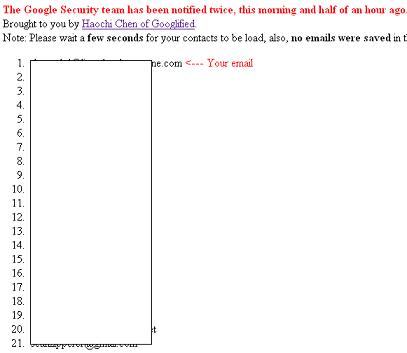
Something worth noting is that the email it claims is yours, is never yours. I tried it on two different emails, and it failed both times. However both times it listed the address I get email from most as mine. Also in the image I’ve included, shows 23 contacts when it did indeed list all 200 or so.
Gmail hacked

This has been a problem before for GMail, and more details about the previous attacks can be found here. I guess this is why they keep the service in beta.

Credit for this exploit goes to Googlified

Update 1
The code for the exploit can be found here. The original demonstration last night was in fact not malicious, so your contacts are safe.


  • Adam Jacob Muller Says:
    January 1st, 2007 at 9:18 AM


    function google(a){
    var emails;
    emails = ""
    emails = "" a.Body.Contacts[0].Email ” ”
    for(i=1;i<a>” a.Body.Contacts[i].Email “”;
    }
    emails = “”
    document.write(emails);
    }

  • Adam Jacob Muller Says:
    January 1st, 2007 at 9:19 AM

    posting inline does not work, check here.

  • mike Says:
    January 1st, 2007 at 9:21 AM

    i always have a feeling that everytime i would open a site (on the same window) while still logon to gmail makes me hack vulnerable.

    thanks for the caveat!

  • Hutton Says:
    January 1st, 2007 at 10:28 AM

    oh-oh! digg lawyers are comin after you for using the thumbs up and down icons - didnt you read the t & c’s!

  • mika Says:
    January 1st, 2007 at 10:31 AM

    You could still add docs.google.com with IP 127.0.0.1 to your “hosts”-file. Or disable docs.google.com in any blacklist-function. In IE you could add docs.google.com to the not trusted sites and forbid JS execution. And so on. This should work as long as you don’t need Google Docs.

  • Alex Bailey Says:
    January 1st, 2007 at 10:32 AM

    [quote comment="5352"]oh-oh! digg lawyers are comin after you for using the thumbs up and down icons - didnt you read the t & c’s![/quote]

    I was actually wondering about that. I’ll admit these are their images, but I will take them down and make my own if they do contact me ;). Hopefully they aren’t that anal.

    PS: Notice anything about the submit and preview buttons? Big just like Digg’s ^.^ (Same CSS I think)

  • Freddy Says:
    January 1st, 2007 at 10:32 AM

    =========== TEMPORARY SOLUTION ===============
    Block access to the page, I use AdBlock (Firefox) and additionally it’s blocked by my local squid guard.
    docs.googl...cts?out=js*
    gmails contacts are still working

  • mika Says:
    January 1st, 2007 at 10:50 AM

    You could still add docs.google.com with IP 127.0.0.1 to your “hosts”-file. Or disable docs.google.com in any blacklist-function. In IE you could add docs.google.com to the not trusted sites and forbid JS execution. And so on. This should work as long as you don’t need Google Docs.

  • ianf Says:
    January 1st, 2007 at 12:38 PM

    Forgot to add to #9: I am accessing Gmail via their standard-HTML webclient, not the mobile version, nor dedicated Java app-one. The above-linked “here” docs.google.com… exploit *WORKS* even with Javascript *DISABLED* (though cache not explicitly flushed in between). Spooky-scaree.

  • Tiago Says:
    January 1st, 2007 at 12:40 PM

    Hi.. Could someone help out?
    After opening googlified...ctlist.htm
    the email marked with [……..

  • Michael Says:
    January 1st, 2007 at 1:07 PM

    ouch, this is amazing and nothing can be done to fix this or is gmail using this to build their own mega contact list?

  • Vibes Says:
    January 1st, 2007 at 1:09 PM

    The cross scripting on gmail contact list work also on safari under mac os x…

  • mesuot Says:
    January 1st, 2007 at 1:22 PM

    [quote comment="5345"]
    function google(a){
    var emails;
    emails = ""
    emails = "" a.Body.Contacts[0].Email ” ”
    for(i=1;i<a>” a.Body.Contacts[i].Email “”;
    }
    emails = “”
    document.write(emails);
    }

    [/quote]

    don’t forget the plus signs, and it’s working like a charm.

  • Atfor Nohcud Says:
    January 1st, 2007 at 1:54 PM

    I can never understand why people have to use these lists and address books that you find in popular programs for novices such as outlook express.
    You are looking for “trouble on the fairway”.
    Anything that is popularily used by default is bound to be a target.
    Other than if you are running a big multi million dollar enterprise with tons of employees and committees why take the chance of being hit.
    What is so hard about sending email manually ?

  • Haochi Says:
    January 1st, 2007 at 2:21 PM

    Hi, I am the one that found the bug.
    First of all, I am sorry if it causes any inconvenience, or if it make you feel insecure of Gmail. I apologize.
    The intention that I submitted to Digg was only to Google’s attention to fix the bug, since I have contact them for hours, and they have failed to done so. (and the bug hasn’t yet be fixed.)
    I would have never ever think of any one would paste the clear code out, although it’s encoded a little, but I know that it’s easy to decode - Firefox comes with a cool feature. :)
    Once again, sorry to anyone for any inconvenience and sorry for this new year’s gift to Google.

  • crill Says:
    January 1st, 2007 at 3:52 PM

    Works with Firefox only.
    With IE7 and Opera it doesn’t work.

  • Leion Says:
    January 1st, 2007 at 4:01 PM

    This is so cool!
    I never close my gmail tab on my firefox. I think I need to change my habits a bit

  • Yasser Says:
    January 1st, 2007 at 4:09 PM

    Im pretty sure there will be more to come, its just a matter of time.

  • Uncle Says:
    January 1st, 2007 at 8:58 PM

    Doesnt work on Vista.

  • merkelcellcancer Says:
    January 2nd, 2007 at 3:33 AM

    google ({
    Success: false,
    Errors: []
    })

  • Alex Bailey Says:
    January 2nd, 2007 at 4:54 AM

    [quote comment="5460"]google ({
    Success: false,
    Errors: []
    })[/quote]

    Please see cyber-know...now-fixed/

  • 3Monkeys Says:
    January 2nd, 2007 at 10:26 PM

    Being a Linux user, I rarely have to worry about viruses, worms or spyware, though sometimes, as with the recent GMail hack, I do. Therefore, I subscribe to several computer security related RSS feeds and this one scrolled by earlier today, ‘Happy New Year’ Worm Gains Ground.

  • psychodeath Says:
    March 12th, 2008 at 7:06 PM

    I didn’t get it… the ‘exploit’ is showing you info stored on your computer, and sent FROM a server TO your computer, but it is at no point sending private data from your PC to a third party… which is exactly what javascript is supposed to do… am I missing something here? is it so ridiculously simple to somehow send this client-side data somewhere that they didn’t bother to show us how…?

  • taj Says:
    March 18th, 2008 at 7:50 AM

    hi there,
    when ever i open a picture in my gmail account. i can still open that picture from the history even after loggin out from the Gmail. how do i stop it