
Recently Posted

advertisement


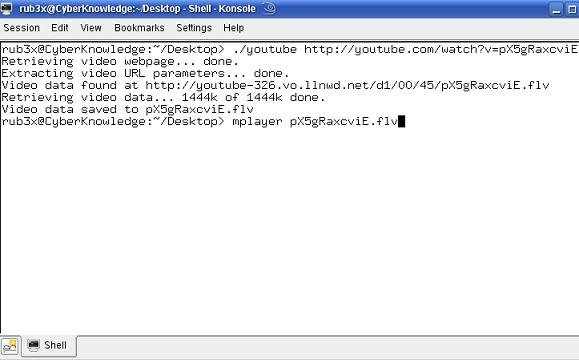
If you don’t want to slow your browser down with Firefox extensions, or you think you’re a command line guru then check out youtube-dl. It’s an open source script written in python. It’ll work on any system capable of running python, including Windows, Linux, and Mac OS. There are a few handy options to name the video the name of the youtube title, simulate the download, and output no text (quite mode). It also currently supports user and passwords for videos dubbed inappropriate to users under 18 as well.
Youtube-dl

The file extension type of the downloaded video is an flv. To open it, I use the cross platform video player VLC. It’ll also open in mplayer.

There really is no install directions for this script, but there are a few commands needed to get it working. Download the script, and name the file “youtube” without the quotes.

chmod 744 youtube (Make the file executable)
mv youtube /usr/bin (Optional, makes it so you don't have to type the direct path to the file each time)
youtube inserturlhere


  • ramunasg Says:
    January 4th, 2007 at 8:35 AM

    You can also convert flv to mpeg or other format if you have ffmpeg installed, like this:

    ffmpeg -i downloaded.flv output.mpeg

  • Ryan Says:
    January 4th, 2007 at 9:16 AM

    I’ve been trying to figure something out like this for quite sometime. Thanks for sharing.

    ffmpeg I knew about but this I guess I just didn’t spend enough time trying to research it.

    Anyways, thanks again!

  • John Says:
    January 4th, 2007 at 9:29 AM

    chmod 744 will make the file only executable by its owner and readable by everyone (rwxr–r–), you probably meant 755 (rwxr-xr-x)

  • troy Says:
    January 4th, 2007 at 9:30 AM

    Is it possible that you guys can write a youtube video uploader? make my life a whole lot easier!

  • KyleGoetz Says:
    January 4th, 2007 at 10:21 AM

    As a suggestion for the next update, why not use the “re” module to grab the title of the video with this regular expression:
    ‘<title>YouTube - (?P<nameofvid>.+?)</title>’

  • vadi Says:
    January 4th, 2007 at 10:43 AM

    sexy product dude! thanx!

  • Jon Says:
    January 4th, 2007 at 8:59 PM

    Does this work on XBMC as well?

  • Lao Says:
    January 4th, 2007 at 9:49 PM

    Why am I getting a “invalid syntax” error from line 102 (do I need a title?)…….

    I _do_ like this script, though!

  • JCMets4112 Says:
    January 5th, 2007 at 8:31 AM

    This is gonna sound like a really dumb question, but..

    What does it mean to “download the script?” I have the Python interpreter. But by download the script..does it mean save the text to a notepad file? save the entire page as an HTML document? I’m a little new to this and I don’t really know what download the script actually means.

  • Alex Bailey Says:
    January 5th, 2007 at 8:36 AM

    [quote comment="5694"]This is gonna sound like a really dumb question, but..

    What does it mean to “download the script?” I have the Python interpreter. But by download the script..does it mean save the text to a notepad file? save the entire page as an HTML document? I’m a little new to this and I don’t really know what download the script actually means.[/quote]

    Open this link in your browser, and go to File > Save as. Save it as “youtube”. Then you need to download the python interpreter if your OS doesn’t come with it. (Windows doesn’t)

    [quote]
    Why am I getting a “invalid syntax” error from line 102 (do I need a title?)…….

    I _do_ like this script, though!
    [/quote]

    What syntax are you using?

    [quote]
    Does this work on XBMC as well?
    [/quote]

    No idea, if it supports python and has internet it should.

  • Damon Says:
    February 6th, 2007 at 8:18 PM

    [quote comment="5648"]Why am I getting a “invalid syntax” error from line 102 (do I need a title?)…….
    [/quote]

    That’s likely because you are using a version of python less than 2.4. Python 2.4 or greater is required to run the script.

  • Savetube Says:
    February 9th, 2007 at 7:41 AM

    I use savetube.com to save any youtube video.

  • zephro Says:
    February 23rd, 2007 at 3:23 AM

    Nice. But, is there anything i can get thatl allow cmd to use this pythons script on a system WITHOUT having python installed?

    I knoww that IMVU uses something for its python scripts :P

  • Alex Bailey Says:
    February 23rd, 2007 at 7:45 AM

    [quote comment="11406"]Nice. But, is there anything i can get thatl allow cmd to use this pythons script on a system WITHOUT having python installed?

    I knoww that IMVU uses something for its python scripts :P[/quote]

    No of course not :). You can use alternative things such as the “video downloader” extension for Firefox.

    I wrote a tutorial about how to do this for my Free Music Videos Site. You can find it here:
    Download Youtube Videos

  • Bay Says:
    May 25th, 2007 at 3:42 AM

    Why am I getting this error ?

    File “./youtube”, line 97
    title = ”.join((x in string.ascii_letters or x in string.digits) and x or ‘ ‘ for x in title)

    Thanks for your help..

  • rajey Says:
    May 29th, 2007 at 9:48 PM

    i am getting invalid syntax.

  • Brian Says:
    June 20th, 2007 at 2:25 PM

    This seems quite complex. I prefer using ZillaTube. It downloads youtube videos quickly, plays them too.

    zillatube.com

  • tomparker Says:
    February 22nd, 2008 at 9:07 PM

    DOES ANYONE KNOW WHERE I CAN DOWNLOAD A YOUTUBE VIDEO DOWNLOADER FOR A MACBOOK! I cant find one any where and this wont even download! please email me with a link it would be very much appreciated!